
SMTP itself has no built-in authentication — any server can claim to be
[email protected] and forge the sender address. Three DNS-based
protocols close this gap: SPF, DKIM, and DMARC. They work
together to give receiving servers a reliable way to verify the sender’s
identity.
While these protocols are built on top of SMTP — the transport layer does not enforce them — they have become essential for deliverability. Most receiving servers will reject, quarantine, or flag messages that fail authentication checks.
SPF (Sender Policy Framework)
SPF allows a domain owner to publish a list of IP addresses that are authorised to send email on its behalf.
How It Works
- The domain owner publishes a TXT record in DNS listing authorised sending IPs.
- When a receiving MTA gets a message claiming to be from
@tinkmail.me, it looks up the SPF record fortinkmail.me. - It checks the connecting IP against the authorised list.
- It returns a pass, fail, or neutral result.
SPF Record Syntax
An SPF record is a single DNS TXT record that starts with v=spf1:
v=spf1 ip4:192.0.2.0/24 ip4:198.51.100.1 include:_spf.google.com ~all
| Mechanism | Meaning |
|---|---|
ip4:192.0.2.0/24 |
Authorises the IP range 192.0.2.0–192.0.2.255. |
include:_spf.google.com |
Includes the SPF record of _spf.google.com (used by Google Workspace). |
~all |
Soft-fail — mark any other IP as suspicious but accept (tilde). |
Qualifiers
| Qualifier | Meaning | Behaviour |
|---|---|---|
+ |
Pass | IP is authorised. (Default, usually omitted.) |
- |
Fail | IP is not authorised — reject the message. |
~ |
SoftFail | IP is not authorised — accept but flag as suspicious. |
? |
Neutral | No assertion — treat as if no SPF record exists. |
Recommendation: Start with
~all(soft-fail) to test your SPF configuration, then move to-all(hard-fail) once you have confirmed all legitimate senders are covered.
Common Pitfalls
- Missing include directives — if you send through multiple providers
(e.g., Google Workspace + a marketing platform), each needs an
include:statement. - DNS lookup limit — SPF records may include at most 10 DNS lookups
(each
include:,a,mxcounts as one). Exceeding this causes a permanent error. - Too broad — using
ip4:0.0.0.0/0or+alleffectively disables SPF.
DKIM (Domain Keys Identified Mail)
DKIM adds a digital signature to every outgoing email, which the receiving server can verify against a public key published in the sender’s DNS.
How It Works
- The sending server signs the email with a private key — including specific headers and (usually) the body.
- The signature is added as a
DKIM-Signatureheader field. - The receiving server looks up the public key from a DNS TXT record
at a selector-specific subdomain (e.g.,
google._domainkey.tinkmail.me). - It verifies the signature. If it matches, the message is DKIM-verified.
DKIM Record Example
default._domainkey TXT "v=DKIM1; k=rsa; p=MIGfMA0GCSqGSIb4... (long public key)"
| Tag | Meaning |
|---|---|
v=DKIM1 |
Version identifier (must be DKIM1). |
k=rsa |
Key type (typically RSA, but Ed25519 is gaining support). |
p=... |
The public key data (base64-encoded). |
DKIM Signature Header
DKIM-Signature: v=1; a=rsa-sha256; d=tinkmail.me;
    s=default; c=relaxed/relaxed; q=dns/txt;
    h=from:to:subject:date:message-id;
    bh=47DEQpj8HBSa+/TImW+5JCeuQeOk...;
    b=MtQy0f5K5A9YlpN0C1Z...
| Tag | Meaning |
|---|---|
v=1 |
DKIM version. |
a=rsa-sha256 |
Signing algorithm. |
d=tinkmail.me |
The signing domain (matches DNS lookup domain). |
s=default |
The selector — determines which DNS record to query. |
c=relaxed/relaxed |
Canonicalisation algorithms for header and body. |
h=... |
The list of signed headers (semicolon-separated). |
bh=... |
The body hash (base64-encoded). |
b=... |
The actual signature (base64-encoded). |
Key Benefits
- Survives forwarding — unlike SPF, DKIM signatures survive message forwarding because the signed content (headers and body) is preserved.
- No IP dependency — DKIM verifies content, not the sending server’s IP address, making it more resilient in complex relay topologies.
Common Pitfalls
- Key rotation — rotate DKIM keys periodically (every 6–12 months) to limit the impact of key compromise.
- Canonicalisation mismatch — if intermediate servers modify the
message (e.g., adding a footer),
relaxedcanonicalisation tolerates minor changes;simpledoes not. - Missing selectors — deleting a DKIM selector from DNS before all signed messages have expired can cause verification failures.
DMARC (Domain-based Message Authentication, Reporting & Conformance)
DMARC tells receiving servers what to do when SPF and/or DKIM checks fail, and provides a reporting mechanism so domain owners can monitor authentication results.
How It Works
- The domain owner publishes a DMARC record in DNS at
_dmarc.tinkmail.me. - The receiving MTA checks SPF and DKIM results, then consults the DMARC policy.
- If neither SPF nor DKIM passes (with alignment), the receiving server applies the policy (none, quarantine, or reject).
- The receiving server may send aggregate and forensic reports back to the reporting address specified in the DMARC record.
DMARC Record Example
_dmarc.tinkmail.me TXT "v=DMARC1; p=reject; rua=mailto:[email protected]; ruf=mailto:[email protected]; pct=100"
| Tag | Meaning |
|---|---|
v=DMARC1 |
Version (must be DMARC1). |
p=reject |
Policy for failures: none, quarantine, or reject. |
pct=100 |
Percentage of messages subject to the policy (1–100). |
rua=mailto:... |
Address for aggregate reports (XML). |
ruf=mailto:... |
Address for forensic (failure) reports. |
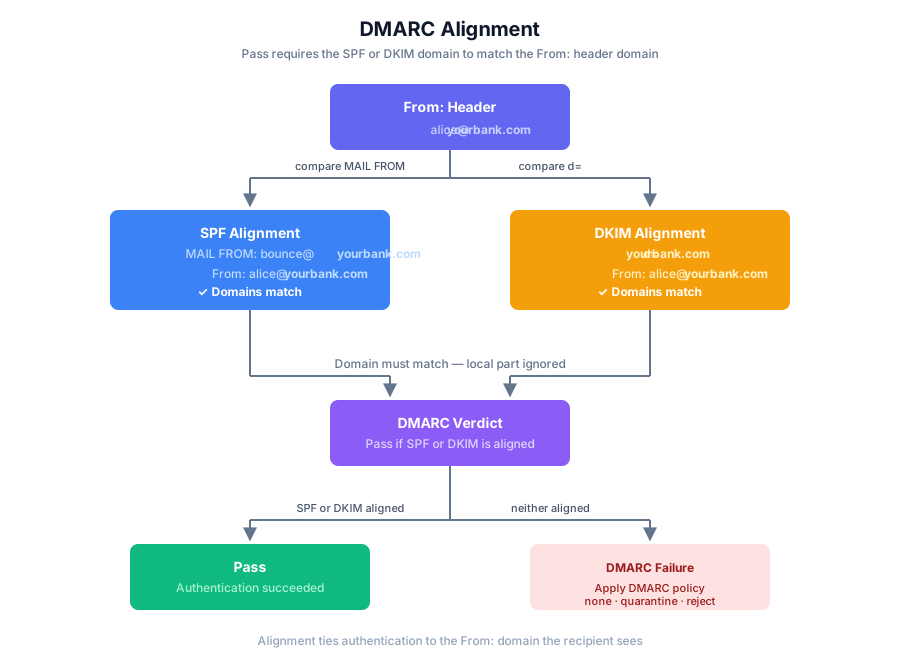
Alignment
For DMARC to pass, SPF or DKIM must pass and be aligned with the
domain in the From: header:
| Check | Alignment Criterion |
|---|---|
| SPF alignment | The domain in the envelope MAIL FROM must match (or be a subdomain of) the domain in the From: header. |
| DKIM alignment | The d= domain in the DKIM signature must match (or be a subdomain of) the From: header domain. |
Alignment is the key insight of DMARC — it prevents a malicious server from using SPF or DKIM for a different domain to pass authentication.
DMARC Policies
| Policy | Meaning | Behaviour |
|---|---|---|
p=none |
Monitor only | Take no action against failures. Used for building visibility before enforcing. |
p=quarantine |
Suspect spam | Deliver to spam folder. |
p=reject |
Reject | Block the message outright (550 response). |
Deployment path: Always start with
p=none, monitor reports for 1–2 weeks, then move top=quarantine, and finallyp=rejectonce you are confident all legitimate senders pass authentication.
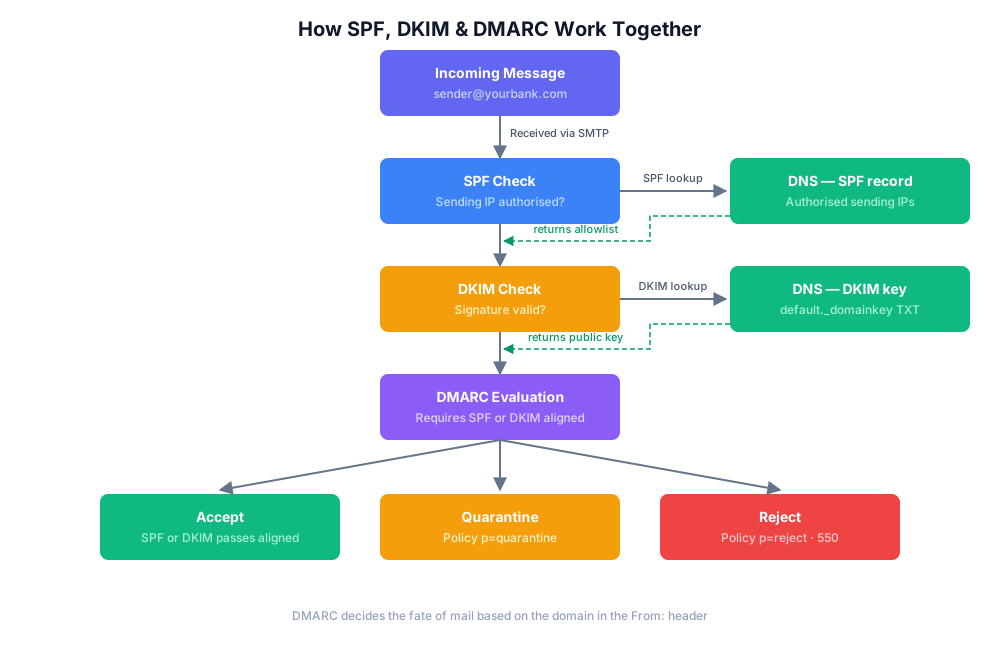
How They Work Together
SPF, DKIM, and DMARC form a pipeline: SPF and DKIM each verify the
message independently, and DMARC ties those results to the domain the
recipient actually sees in the From: header before deciding what to do
if the checks fail.
Troubleshooting Authentication Failures
- Check your DNS records — use
dig TXT tinkmail.mefor SPF,dig TXT default._domainkey.tinkmail.mefor DKIM, anddig TXT _dmarc.tinkmail.mefor DMARC. - Test with a mail-tester tool — send a test email to a service that analyses SPF, DKIM, and DMARC headers.
- Monitor DMARC reports — the XML aggregate reports (
rua) tell you which sources are passing and failing. Look for unexpected IP addresses (possible spoofing) or missinginclude:statements. - Beware of forwarding — mailing lists and forwarders can break SPF (because the forwarding IP does not match the original SPF record). DKIM is more resilient, so aim for DKIM alignment as your primary authentication path.
Further Reading
- SMTP Protocol in Practice — how authentication fits into the SMTP command sequence.
- SMTP Response Codes —
what
550 5.7.1(SPF failure) and similar codes mean. - RFC 7208 — SPF specification (obsoleted RFC 4408).
- RFC 6376 — DKIM specification (obsoleted RFC 4871).
- RFC 7489 — DMARC specification.