
Email is not a single application, but rather a coordinated system of different protocols that handle sending, receiving, and managing messages. These protocols operate at different layers of the mail stack: some handle outbound delivery, others manage mailbox access, and still others provide synchronisation of contacts and calendar data alongside email.
Understanding this protocol landscape is valuable when integrating mail services, troubleshooting delivery issues, selecting client-server architectures, or evaluating vendor platforms. This document provides a neutral, technical overview of the most widely deployed email protocols.
Five protocols dominate the email ecosystem today. SMTP handles outbound delivery and server-to-server relay. IMAP and POP3 manage mailbox retrieval — IMAP keeps messages on the server for multi-device sync, while POP3 downloads them for local-only access. Exchange ActiveSync (EAS) provides push-based synchronisation of email, calendar, and contacts to mobile devices. Exchange Web Services (EWS) offers programmatic SOAP/XML access to Exchange mailbox data for automation and integration. If you run a mail service, you need SMTP for delivery and IMAP for client access; EAS and EWS are relevant if you support Exchange or build integrated tooling.
| Characteristic | SMTP | IMAP | POP3 | EAS | EWS |
|---|---|---|---|---|---|
| Direction | Outbound (send) | Inbound (retrieve) | Inbound (retrieve) | Bidirectional sync | Bidirectional API |
| Storage model | Relay only | Server-side | Local device | Server-side | Server-side |
| Synchronisation | — | Pull (polling) | Manual (one-shot) | Push (real-time) | Pull (request) |
| Scope | Mail + Calendar + Contacts | Mail + Calendar + Contacts + Tasks | |||
| Standard port | 465 / 587 / 25 | 993 | 995 | 443 (HTTPS) | 443 (HTTPS) |
| Encryption | TLS / STARTTLS | TLS | TLS | TLS | TLS |
| Application | Server (MTA) | Client (MUA) | Client (MUA) | Mobile device | Integration / Tooling |
The protocols covered in this article are:
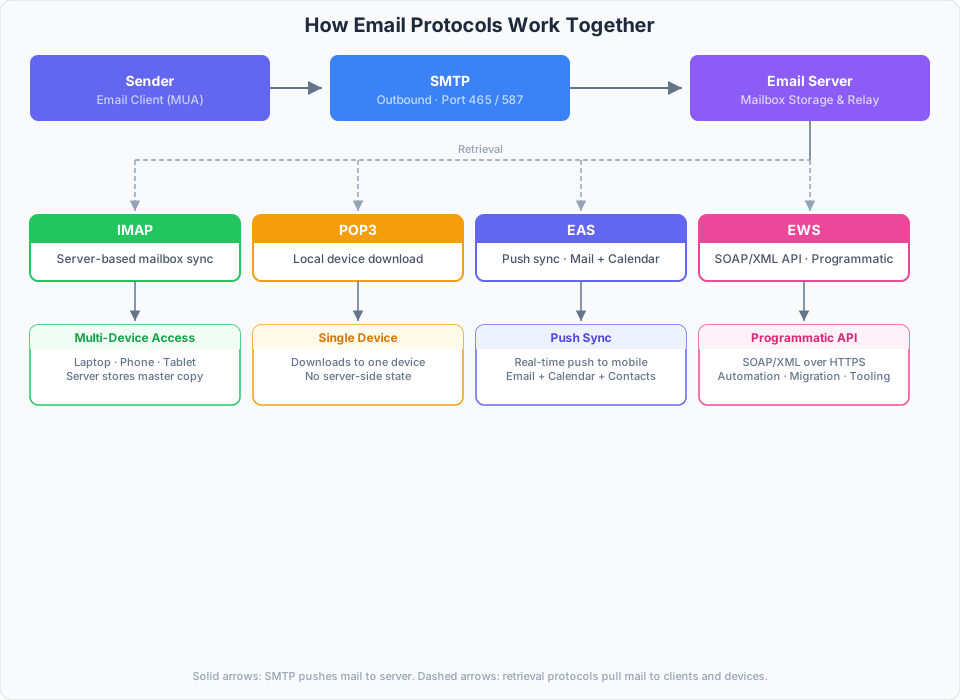
SMTP pushes outgoing mail to the server. IMAP provides server-side mailbox sync; POP3 downloads for local-only access. EAS pushes email, calendar, and contacts to mobile devices. EWS provides programmatic SOAP/XML access to mailbox data.
1. SMTP (Simple Mail Transfer Protocol)
Function: Sending and relaying email messages.
SMTP is the delivery mechanism of the email ecosystem. It handles outbound message transport from the sender’s mail client (MUA) through submission agents (MSA) and transfer agents (MTA) until the message reaches the destination server.
- Submission (port 587): Email clients submit outgoing messages to their provider’s mail server using SMTP with STARTTLS.
- Relay (port 25): Mail servers exchange messages with each other using SMTP, routing toward the destination domain’s MX record.
SMTP is concerned only with outbound delivery — it plays no role in how recipients retrieve or read their mail.
2. IMAP (Internet Message Access Protocol)
Function: Remote mailbox access with server-side storage.
IMAP is the dominant standard for email retrieval. It maintains messages on the server and synchronises mailbox state across all connected clients.
- Server-side storage: Messages remain on the server until explicitly deleted, enabling access from any device.
- State synchronisation: Read/unread status, folder organization, and deletions are reflected consistently on every client.
- Port: 993 (IMAPS).
IMAP is suitable for users and organisations that access email from multiple devices and require a consistent view of their mailbox.
3. POP3 (Post Office Protocol version 3)
Function: One-time email download to a single device.
POP3 predates IMAP and was designed when server storage was expensive and network connectivity was intermittent.
- Local storage: Messages are downloaded to the client and typically removed from the server after retrieval.
- No synchronisation: Actions taken on one device are local to that device only and are not reflected elsewhere.
- Port: 995 (POP3S).
POP3 is used in niche scenarios such as archival workflows, offline-heavy environments, or configurations where minimal server storage is a requirement.
Protocol Comparison
| Feature | IMAP | POP3 |
|---|---|---|
| Storage | Server (Cloud) | Local Device |
| Sync | Yes (Multi-device) | No (Single device) |
| Offline Access | Limited (Cached) | Full (Downloaded) |
| Backup | Handled by Provider | User Responsibility |
| Standard Port | 993 (SSL/TLS) | 995 (SSL/TLS) |
4. Exchange ActiveSync (EAS)
Function: Push-based synchronisation of email, contacts, and calendar over HTTP.
Exchange ActiveSync is a Microsoft protocol that synchronises mailbox data between servers and mobile devices over HTTPS. It was originally developed for Windows Mobile and later licensed to third-party vendors.
- Push technology: Mail, calendar, and contact changes are pushed to the client in near real-time without polling.
- Wireless protocol: Operates over HTTP(S) with XML-serialized commands, making it suitable for mobile and bandwidth-constrained environments.
- Licensing: EAS is covered by Microsoft patents. Third-party implementations (server or client) typically require a licensing agreement with Microsoft. Open-source projects such as Z-Push provide EAS compatibility layers for non-Exchange backends but operate within the bounds of Microsoft’s licensing terms.
- Common use case: Mobile device synchronisation with Microsoft Exchange or hosted Exchange-compatible services.
5. Exchange Web Services (EWS)
Function: Programmatic XML/SOAP-based access to Exchange mailbox data.
EWS is an API introduced by Microsoft with Exchange 2007 as the successor to MAPI and WebDAV. It provides deep, structured access to Exchange mailboxes beyond basic email retrieval.
- Full mailbox access: Manage email, calendar, contacts, tasks, and public folders through a unified SOAP/XML interface over HTTPS.
- Licensing: EWS ships as part of the Exchange Server product; client and integration implementations do not require a separate license. However, Microsoft has deprecated EWS for new application development in favour of Microsoft Graph and recommends migration for ongoing projects.
- Common use case: Server-side automation, migration tooling, and legacy Exchange integration where Graph API is not yet available.