
BIMI (Brand Indicators for Message Identification) is a DNS-based standard that lets brands display their logo next to authenticated emails in supported email clients. Instead of a generic avatar or a blank circle, recipients see a verified brand logo — right in the inbox.
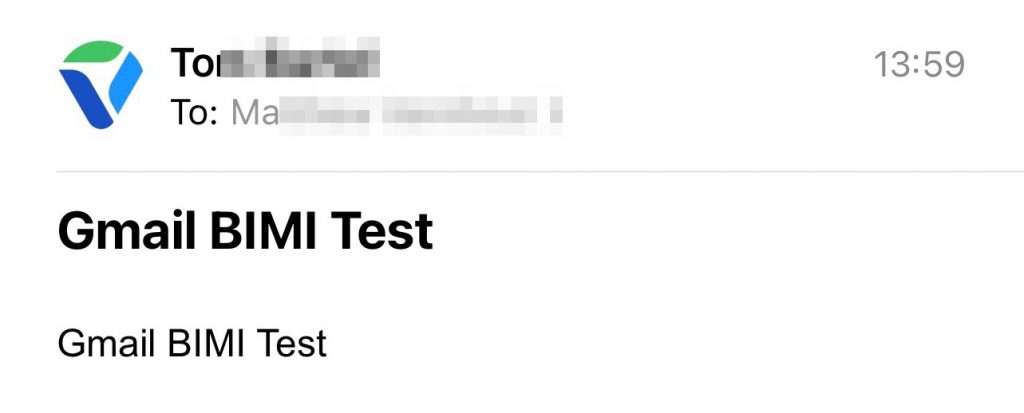
Apple Mail on iOS displays BIMI logos both in the message list and in the open message, providing a consistent brand experience across the inbox.
How BIMI Works (High-Level)
BIMI doesn’t change how email is delivered. It’s purely a display-layer enhancement — think of it as a profile picture for your domain.
- You publish a BIMI DNS TXT record that points to your brand logo (in SVG format).
- When an email arrives, the recipient’s mail server checks that the message passes DMARC authentication.
- If DMARC passes, the server queries the DNS for the BIMI record and fetches the logo from the URL it specifies.
- For some receivers (notably Gmail and Apple Mail), a VMC (Verified Mark Certificate) is also required to prove you own the trademark for the logo.
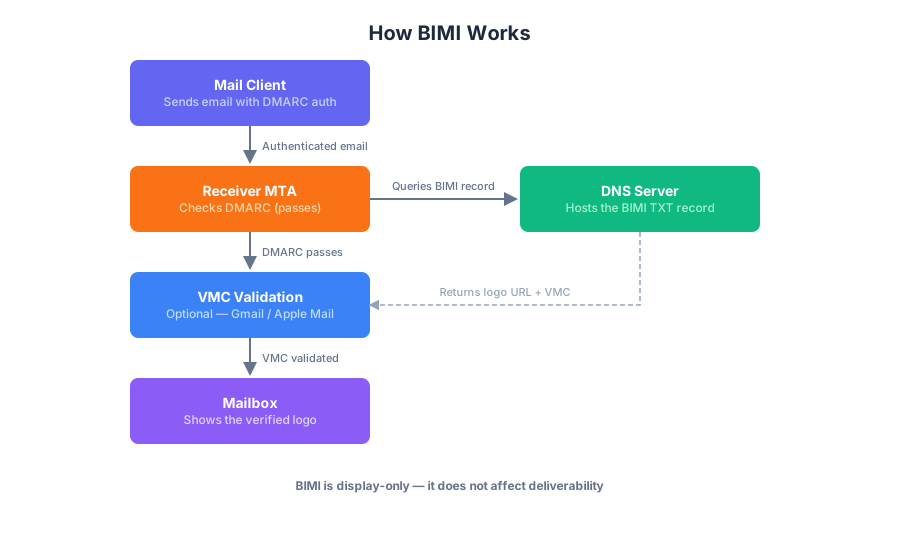
The BIMI flow at a glance: an authenticated email triggers a DNS lookup for the BIMI record, which returns the logo URL and optional VMC. The receiver verifies the certificate and renders the logo.
Prerequisites
BIMI has three requirements, each building on the last.
1. DMARC — Set to p=quarantine or p=reject
BIMI only works when a message passes DMARC authentication. A DMARC policy of p=none (monitor-only) will not activate BIMI. You need:
- SPF or DKIM passing for your sending domain.
- DMARC policy set to
p=quarantineorp=reject. - DMARC alignment: the domain in the
From:header must match the domain authenticated by SPF or DKIM.
2. BIMI DNS Record
Publish a TXT record at this DNS location:
default._bimi.<yourdomain.com>
The record value uses this format:
v=BIMI1; l=https://assets.yourdomain.com/logo/logo.svg; a=https://assets.yourdomain.com/logo/logo.pem;
| Field | Required | Description |
|---|---|---|
v |
Yes | Version — always BIMI1 |
l |
Yes | URL to your SVG logo (must be HTTPS) |
a |
No | URL to your VMC certificate (PEM format) |
Here is a real example from Apple’s BIMI record:
$ dig TXT default._bimi.apple.com +noall +answer +question

; <<>> DiG 9.10.6 <<>> TXT default._bimi.apple.com +noall +answer +question
;; global options: +cmd
;default._bimi.apple.com.	IN	TXT
default._bimi.apple.com. 1800	IN	TXT	"v=BIMI1;l=https://www.apple.com/bimi/v2/apple.svg;" "a=https://www.apple.com/bimi/v2/apple.pem;"
Verifying Apple’s BIMI record with dig. The ANSWER section shows the logo URL and certificate URL.
3. VMC (Verified Mark Certificate)
A VMC is an X.509 certificate that proves you own the trademark for the logo displayed in BIMI. It is:
- Required by Gmail for all senders (both web and mobile).
- Required by Apple Mail on iOS 16+, iPadOS 16+, and macOS 13+ (Ventura).
- Optional for other providers (Fastmail, Yahoo, La Poste).
Where to get one:
| Provider | Notes |
|---|---|
| DigiCert | The original BIMI CA; widely recognised. |
| Entrust | Another trusted BIMI CA. |
| GlobalSign | Newer entrant, competitive pricing. |
| Sectigo | Also issues VMCs. |
Cost: VMCs typically range from $500–$1,500 per year depending on the CA and trademark coverage. This is the biggest barrier for small businesses.
Tip: You must already own a registered trademark (national or EU) that matches your logo. A VMC cannot be issued for an unmarked logo.
BIMI SVG Requirements
Not every SVG will work. BIMI requires a specific SVG profile:
- Format: SVG Tiny PS (Portable/Secure), the strict mobile profile defined by the BIMI Working Group.
- Shape: The logo must be square (1:1 aspect ratio) — the receiver clips it into a circle automatically.
- Size: Under 32 KB.
- Colours: Use solid, opaque colours. Gradients and patterns may not render on all clients.
- No external references: No embedded raster images (PNG/JPEG), no external fonts, no JavaScript, no animations.
- Colour space: sRGB is recommended for consistent display.
There are online validators — such as the BIMI Group’s tools — that will verify your SVG meets the Tiny PS profile.
Tools for Checking & Validating BIMI
Validate your BIMI setup
- BIMI Validator — checks the format of your BIMI record and that DMARC is at enforcement.
- BIMI Record Builder — generates a correctly formatted BIMI DNS record from your logo and certificate URLs.
dig TXT default._bimi.<yourdomain.com>— quick CLI check that the record is published and thel=URL is reachable.
Convert / validate the SVG format
The SVG Tiny PS profile is strict, and most editors don’t export it natively. Use these to get there:
- BIMI SVG Assistant tool — paste your SVG in, validate and normalize it into the Tiny PS profile.
- SVG Conversion Tools — BIMI Group’s list of recommended SVG Tiny PS conversion tools.
- Inkscape — free editor that can save SVGs in the SVG Tiny profile.
Which Email Clients Support BIMI?
| Client | BIMI Support | VMC Required? |
|---|---|---|
| Gmail (Web) | ✓ | Yes |
| Gmail (Android / iOS) | ✓ | Yes |
| Apple Mail (iOS 16+ / iPadOS 16+) | ✓ | Yes |
| Apple Mail (macOS 13+ Ventura) | ✓ | Yes |
| Fastmail | ✓ | No |
| Yahoo Mail | ✓ | No |
| La Poste | ✓ | No |
| Outlook (Web/Desktop) | ✗ | N/A |
| Proton Mail | ✗ | N/A |
Support is growing. As more mailbox providers adopt BIMI, the logo will appear across more inboxes.
TinkMail today: we publish a BIMI record with an SVG logo, but do not yet hold a VMC. As a result, our logo currently shows in clients that don’t require a certificate (Yahoo Mail, Fastmail, etc.), while Gmail and Apple Mail will only display it once a VMC is issued.
Limitations
- No deliverability benefit. BIMI is display-only — it will not help your email reach the inbox if other authentication or reputation factors are failing.
- VMC cost is significant. For small businesses, $500+/year can be hard to justify purely for a logo.
- Not all clients support it. A large portion of recipients (Outlook, Proton, etc.) will still see a generic avatar.
- SVG constraints. Some complex brand logos (gradients, non-circular shapes) may need to be simplified or recreated to meet the SVG Tiny PS spec.
BIMI is a relatively new standard, but it’s becoming a meaningful trust signal in the inbox. Pair it with strong SPF, DKIM, and DMARC — and your authenticated emails will carry your brand identity everywhere that supports it.