
This post covers the core delivery narrative — the 7-step journey from sender to recipient.
How SMTP Works: The 7-Step Journey
When you click ‘Send’, your email client does not magically place the message in the recipient’s inbox. It hands it off to an SMTP server, initiating a multi-step relay process.
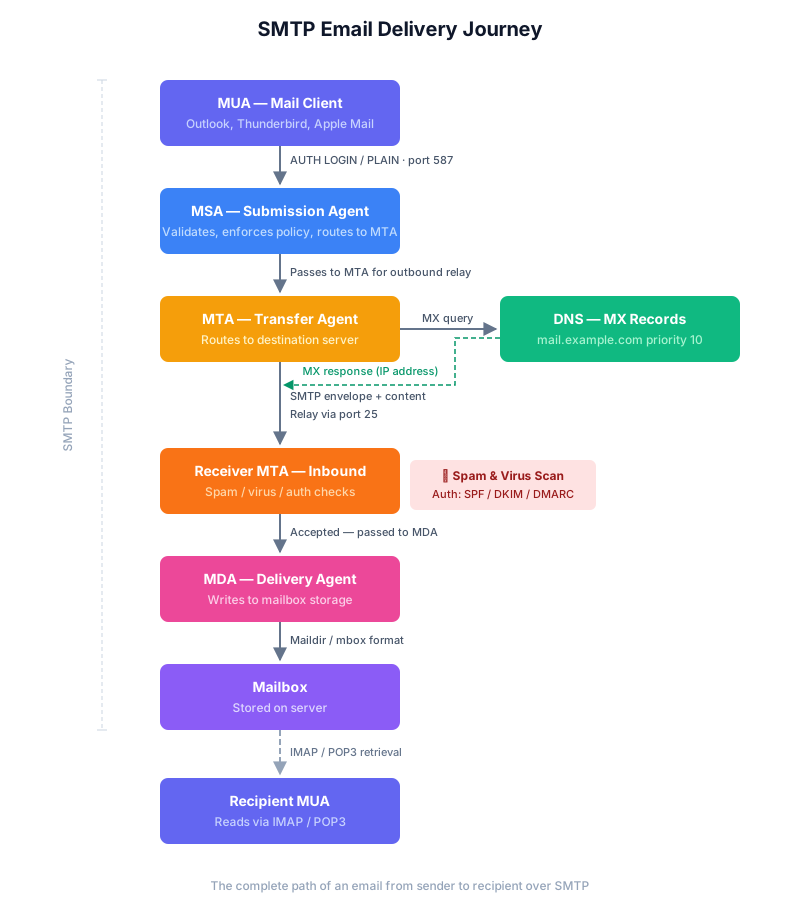
The complete life cycle of an email: from the sender’s MUA through submission, relay, DNS resolution, and final delivery to the recipient’s mailbox.
Step 1: Submission (MUA → MSA)
Your email client (MUA — Mail User Agent) connects to your provider’s SMTP server (MSA — Mail Submission Agent). This connection is typically made on:
- Port 587 — with STARTTLS encryption (the modern standard).
- Port 465 — with implicit SSL/TLS encryption (legacy, but still widely used).
You authenticate with your username and password (or an app-specific password) so the server knows who you are and that you are allowed to send.
The conversation begins with the client issuing EHLO (Extended Hello),
followed by AUTH to authenticate. Once authorised, the client sends the
message envelope and content.
Step 2: Processing and Routing (MSA → MTA)
The MSA checks the message for validity:
- Is the sender authorised to use this domain?
- Is the attachment size within limits?
- Are the addressing headers well-formed?
- Does the message pass outbound spam and virus policies?
Once validated, the MSA passes the message to the MTA (Mail Transfer
Agent) — the component responsible for routing and relaying. The MTA
examines the recipient address ([email protected]) and determines
where to send it next.
Step 3: DNS Lookup (MX Records)
The MTA queries the Domain Name System (DNS) to find the MX (Mail
Exchange) record for example.tinkmail.me. This record tells the MTA which
server is authoritative for receiving email for that domain.
dig MX example.tinkmail.me
; <<>> DiG 9.10.6 <<>> MX example.tinkmail.me
;; QUESTION SECTION:
;example.tinkmail.me.           IN  MX

;; ANSWER SECTION:
example.tinkmail.me.     1800   IN  MX  10  mail.example.tinkmail.me.
example.tinkmail.me.     1800   IN  MX  20  mx-backup.example.tinkmail.me.
MX records include a priority number — lower values have higher priority.
If mail.example.tinkmail.me (priority 10) is unreachable, the sending MTA
automatically retries mx-backup.example.tinkmail.me (priority 20). This
mechanism provides built-in failover.
Step 4: Transmission (Relay)
The sending MTA opens a connection to the recipient’s MTA (e.g.,
mail.example.tinkmail.me) on port 25 — the standard port for server-to-server
SMTP relay. The conversation follows a well-defined sequence of commands
and responses:
| Step | Command | Purpose |
|---|---|---|
| Greeting | EHLO sender.tinkmail.me |
The sending MTA identifies itself. |
| Envelope From | MAIL FROM: <[email protected]> |
Declares the sender’s address (reverse-path). |
| Envelope To | RCPT TO: <[email protected]> |
Declares the recipient’s address (forward-path). |
| Data | DATA |
Signals that the email headers and body follow. |
| End | QUIT |
Ends the SMTP session. |
Note:
EHLO(Extended Hello) is preferred over the olderHELObecause it enables SMTP extensions such as STARTTLS, PIPELINING, and 8BITMIME. If the receiving server does not recogniseEHLO, the sender falls back toHELO.
The sending MTA waits for a numeric response code after each command. A
250 code means success; a 550 code means the recipient was rejected.
The response codes are covered in depth in the next post of this series.
Step 5: Inbound Processing
The recipient’s MTA receives the message and performs several checks before accepting it for local delivery:
- Spam filtering — content analysis, header inspection, and reputation scoring.
- Virus scanning — attachment and link analysis.
- Authentication verification — SPF, DKIM, and DMARC checks against the sending domain’s DNS records.
- Rate limiting — ensures the sender is not flooding the server.
Messages that fail these checks may be rejected outright (550),
quarantined for review, or tagged with spam headers and still delivered.
Step 6: Delivery (MDA)
After passing inbound checks, the message is handed to the MDA (Mail Delivery Agent). The MDA is responsible for the final step: writing the message into the recipient’s mailbox on the server’s storage — typically in Maildir or mbox format — and optionally running Sieve scripts or server-side filters.
Step 7: Retrieval
The recipient uses IMAP or POP3 to download or view the message from their local mailbox on the server.
- IMAP — messages stay on the server, synced across devices.
- POP3 — messages are downloaded to one device and typically removed from the server.
This retrieval step uses a separate protocol — SMTP is only responsible for the delivery of the message to the server, not for how the recipient reads it.
Related Posts
- Delivery Status Notifications (DSN) — the envelope vs. header distinction, DSN notification types, and the NOTIFY parameter.
- SMTP Bounces & the Null Reverse-Path — how permanent failures generate bounce messages, the null reverse-path loop breaker, and VERP.
- SMTP Response Codes — understanding 2xx, 3xx, 4xx, and 5xx codes.
- SMTP Ports, Authentication & Extensions — ports, SMTP AUTH, extensions, and common mistakes.